
Anúncios
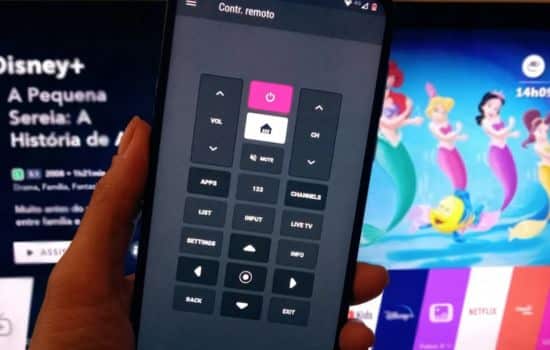
Remote control apps have revolutionized how we interact with our home entertainment systems, turning smartphones into powerful universal remotes that eliminate clutter and simplify daily life.


Gone are the days of juggling multiple remote controls for different devices. Modern technology has enabled our smartphones to communicate seamlessly with TVs, streaming boxes, air conditioners, and countless other smart home devices.
Anúncios
This transformation hasn’t just made life more convenient—it’s fundamentally changed how we think about controlling our electronic ecosystem.
Whether you’ve lost your physical remote between couch cushions or simply want to streamline your entertainment setup, remote control apps offer an elegant solution.
Anúncios
These applications leverage infrared blasters, Wi-Fi connectivity, and Bluetooth technology to bridge the gap between your smartphone and household electronics. 📱
Why Your Smartphone Makes the Perfect Universal Remote
The device you carry everywhere already possesses the processing power and connectivity options needed to control virtually any electronic device in your home. Unlike traditional remotes that require line-of-sight and specific positioning, smartphone apps can often control devices through walls and from greater distances.
Your phone never needs new batteries, rarely gets lost, and receives regular software updates that expand compatibility with new devices. The touchscreen interface allows for customizable layouts, programmable macros, and even voice control integration—features that would be impossible with traditional button-based remotes.
Many modern smartphones come equipped with built-in infrared blasters, though this feature has become less common. For devices without IR capabilities, Wi-Fi and Bluetooth connections provide alternative pathways for communication with smart home electronics. This flexibility means almost any smartphone can transform into a universal remote with the right app.
Understanding the Technology Behind Remote Control Apps 🔧
Remote control applications utilize three primary technologies to communicate with your devices. Infrared (IR) technology mimics traditional remote controls by emitting invisible light pulses that carry encoded commands. This method works with older televisions, air conditioners, and audio systems that weren’t designed with smart connectivity in mind.
Wi-Fi connectivity enables apps to control smart devices connected to your home network. This approach offers several advantages: commands work from anywhere in your home (or even remotely via the internet), multiple devices can be controlled simultaneously, and you can receive feedback from devices about their current status.
Bluetooth technology provides a middle ground, offering reliable connections within a reasonable range without requiring network infrastructure. Many soundbars, speakers, and newer entertainment devices support Bluetooth control, making it an increasingly popular option for remote control apps.
Setting Up Your Smartphone as a Universal Remote
Getting started with a remote control app typically involves a straightforward setup process. After downloading your chosen application, you’ll need to identify which devices you want to control and how they connect—whether through IR, Wi-Fi, or Bluetooth.
Most apps feature extensive device databases containing pre-programmed commands for thousands of manufacturers and models. Simply select your device brand and model, and the app automatically configures the appropriate control scheme. If your device isn’t in the database, many apps offer learning modes that let you teach them commands from your physical remote.
For Wi-Fi-enabled devices, you’ll typically connect the app to your home network and allow it to scan for compatible devices. Smart TVs, streaming boxes, and modern audio equipment usually appear automatically, requiring just a confirmation tap to add them to your control interface.

Key Features That Transform Your Control Experience
Modern remote control apps go far beyond simply replicating physical remote buttons. Customizable interfaces let you arrange controls exactly how you prefer, placing frequently used functions front and center while hiding less common options in submenus.
Macro programming enables single-tap execution of complex command sequences. Imagine pressing one button that dims your lights, turns on your TV, switches to your favorite streaming service, and adjusts the volume to your preferred level—all automatically. These automated routines eliminate repetitive tasks and create seamless entertainment experiences.
Voice control integration transforms natural language into device commands. Instead of navigating menus, simply tell your phone to “switch to Netflix” or “increase volume by 20%.” This hands-free operation proves especially valuable when you’re cooking, exercising, or otherwise occupied.
Multi-Room Control and Home Automation Integration 🏠
Advanced remote control apps support multi-room configurations, allowing you to manage different entertainment zones from a single interface. Control the living room TV while adjusting the bedroom air conditioner, all without switching apps or walking between rooms.
Integration with broader smart home ecosystems amplifies functionality exponentially. When your remote app connects with platforms like Google Home, Amazon Alexa, or Apple HomeKit, you gain access to sophisticated automation scenarios that respond to time, location, or other trigger conditions.
Geofencing capabilities can automatically adjust settings based on your location. Your entertainment system might power on as you arrive home, or everything could switch to standby mode when the last person leaves. These intelligent behaviors create a truly responsive living environment.
Compatibility Considerations and Device Support
Before committing to a particular remote control app, verify compatibility with your existing devices. While most apps support major brands like Samsung, LG, Sony, and Philips, obscure or regional brands may have limited support.
Smart TV compatibility extends beyond basic controls to include content navigation, app launching, and keyboard input for searches. Check whether your TV’s operating system (Android TV, webOS, Tizen, Roku OS) is specifically supported by the app for full functionality.
Air conditioner control requires precise support for your specific model, as temperature settings, modes, and fan speeds vary significantly between manufacturers. Apps with extensive AC databases typically provide the most reliable performance for climate control.
Streaming Device Integration 📺
Popular streaming platforms like Roku, Fire TV, Apple TV, and Chromecast each have official apps offering deep integration with their respective ecosystems. However, universal remote apps can control these devices alongside your other electronics, providing a unified interface that eliminates app-switching.
Content discovery features in advanced remote apps aggregate viewing options across multiple streaming services, helping you find shows without manually checking each platform. Some apps even remember your viewing preferences and suggest personalized content recommendations.
Keyboard functionality significantly improves the streaming experience, as typing on a smartphone screen is far easier than navigating on-screen keyboards with directional buttons. Search for shows, enter passwords, or post comments using your phone’s familiar input methods.
Troubleshooting Common Remote Control App Issues
Connection problems typically stem from network issues, device compatibility, or configuration errors. If IR control isn’t working, confirm your smartphone has an infrared blaster and that nothing obstructs the line of sight to your device. Position your phone properly and try adjusting the transmission angle.
Wi-Fi connectivity issues often resolve by ensuring both your phone and target devices connect to the same network. Some routers isolate devices for security, preventing communication between your phone and entertainment equipment. Check router settings for AP isolation or guest network restrictions.
Delayed responses or missed commands might indicate signal interference, low battery levels, or processing limitations. Close unnecessary background apps, move closer to Wi-Fi access points, or restart both your phone and controlled devices to refresh connections.
Battery Optimization and Performance Tips ⚡
Remote control apps can drain battery faster than typical applications due to constant connectivity requirements. Enable battery optimization features within your phone’s settings for the remote app, allowing intelligent management of background processes without disrupting functionality.
Reduce screen brightness when using the app, as you don’t need maximum illumination for most control functions. Dark mode interfaces, when available, further conserve battery by minimizing pixel power consumption on OLED and AMOLED displays.
Configure the app to disconnect from devices during periods of inactivity. While maintaining constant connections ensures instant response, scheduled disconnections during sleep hours or when you’re away preserve battery life without sacrificing practical convenience.
Security and Privacy Considerations 🔒
Remote control apps require various permissions to function properly, including network access, Bluetooth, and sometimes location services. Review permission requests carefully and grant only what’s necessary for your intended use cases. Reputable apps explain exactly why each permission is needed.
Network-connected remote apps can potentially expose your devices to unauthorized access if proper security measures aren’t implemented. Use apps from established developers with strong security track records, and keep both the app and your devices updated with the latest security patches.
Some remote apps collect usage data to improve functionality and provide personalized recommendations. Check privacy policies to understand what information is gathered, how it’s used, and whether it’s shared with third parties. Opt out of data collection when possible if privacy concerns outweigh convenience benefits.
Choosing the Right Remote Control App for Your Needs
Your ideal remote control app depends on your specific device ecosystem, desired features, and usage patterns. Free apps with ad support work perfectly well for basic control needs, while premium versions offer advanced features like macro programming, multi-room support, and ad-free experiences.
User interface design significantly impacts daily usability. Test several apps to find layouts that feel intuitive and responsive. Some people prefer minimalist designs with essential controls prominently displayed, while others appreciate comprehensive interfaces that expose every available function.
Read recent user reviews focusing on your specific device brands and models. An app might work flawlessly with Samsung TVs but struggle with LG models, or vice versa. Real-world feedback from users with similar setups provides valuable insights beyond marketing claims.
Future-Proofing Your Remote Control Setup 🚀
As smart home technology evolves, your remote control app should adapt alongside new devices and standards. Choose apps with active development teams that regularly release updates, add device support, and implement emerging connectivity protocols.
Matter protocol adoption promises greater interoperability between smart home devices regardless of manufacturer. Remote control apps supporting Matter will automatically gain compatibility with an expanding range of products without requiring individual integration work.
Artificial intelligence integration will enable predictive behaviors and context-aware automation. Future remote apps might anticipate your entertainment preferences based on time, weather, who’s home, and viewing history—launching content before you even ask.
Maximizing Value from Your Remote Control App Experience
Take time to fully configure your remote app with custom layouts, programmed macros, and personalized settings. The initial investment of 30-60 minutes creating optimized control interfaces pays dividends through months of streamlined operation.
Explore advanced features beyond basic controls. Many users never discover capabilities like scheduled commands, conditional automation, or widget integration that could significantly enhance their experience. Browse app documentation and tutorial videos to uncover hidden functionality.
Share your setup with family members by creating multiple user profiles with age-appropriate restrictions. Children can access entertainment controls without adjusting system settings or making purchases, while adults retain full administrative capabilities.
Combining Physical and Digital Control Options 🎮
Remote control apps work best as part of a hybrid approach rather than complete physical remote replacement. Keep traditional remotes accessible for guests unfamiliar with your smartphone setup, and as reliable backups when your phone battery runs low.
Some situations genuinely benefit from physical controls—tactile feedback lets you adjust volume without looking during movies, and dedicated buttons provide faster access than unlocking phones and launching apps. Find the balance that maximizes convenience for your household.
Consider dedicated remote accessories that enhance smartphone control, like Bluetooth keypads offering physical buttons mapped to your most-used functions. These accessories provide the best of both worlds: smartphone intelligence with traditional remote ergonomics.
Transforming Daily Life Through Smarter Control
Remote control apps represent more than technological convenience—they fundamentally reshape how we interact with our living spaces. By consolidating control of disparate devices into unified, intelligent interfaces, these applications eliminate friction from daily routines and create space for more meaningful activities.
The time saved searching for remotes, switching between devices, and executing repetitive command sequences accumulates significantly over weeks and months. More importantly, seamless control reduces frustration and cognitive load, making home entertainment genuinely relaxing rather than technically challenging.
As your smart home ecosystem grows, a capable remote control app becomes the central nervous system coordinating all connected devices. This unified approach prevents the fragmentation that often accompanies smart home adoption, where managing multiple incompatible apps becomes more burdensome than the problems technology was supposed to solve. ✨
