
Anúncios
Photo editing apps have transformed how we capture, enhance, and share our visual stories, making professional-quality edits accessible right from our smartphones.


Whether you’re a social media enthusiast, a budding photographer, or simply someone who wants their memories to look their absolute best, the right photo editing application can make all the difference. The digital age has brought us an incredible array of tools that were once exclusive to expensive desktop software.
Anúncios
Today’s mobile editing platforms offer everything from basic adjustments to advanced features like selective color grading, object removal, and AI-powered enhancements. Let’s explore what makes these apps essential and how to choose the perfect one for your creative needs. 📱✨
Why Mobile Photo Editing Has Revolutionized Visual Content Creation
The shift from desktop to mobile editing represents one of the most significant changes in digital photography. Gone are the days when you needed to transfer images to a computer and spend hours learning complex software. Now, powerful editing capabilities fit comfortably in your pocket.
Anúncios
Mobile photo editors have democratized visual content creation. A teenager can create stunning Instagram posts with the same tools professional influencers use. Small business owners can craft compelling product images without hiring photographers. Travel enthusiasts can perfect their vacation shots before they even leave the beach.
The convenience factor cannot be overstated. You take a photo, edit it within minutes, and share it with the world—all from a single device. This seamless workflow has fundamentally changed how we document and communicate our experiences through imagery.
Essential Features Every Quality Photo Editing App Should Have
Not all editing applications are created equal. Understanding which features truly matter helps you cut through the noise and find tools that deliver real value rather than just flashy gimmicks.
Basic Adjustment Controls That Form Your Foundation 🎨
Every competent editing app must offer fundamental controls over exposure, contrast, highlights, shadows, and saturation. These basic adjustments form the foundation of good editing. Without precise control over these elements, you’re essentially working with training wheels permanently attached.
White balance correction is equally crucial. Different lighting conditions create different color temperatures, and the ability to neutralize or enhance these tones separates amateur snapshots from polished images. Look for apps that offer intuitive sliders with real-time previews.
Sharpness and clarity tools help bring definition to your images. However, quality apps provide these without creating artificial-looking halos or noise. The best applications use sophisticated algorithms that enhance detail while maintaining natural appearance.
Advanced Capabilities for Creative Expression
Beyond basics, truly exceptional editing apps include selective adjustment tools. The ability to edit specific areas of your photo—brightening a subject’s face while keeping the background unchanged, for example—transforms your creative possibilities exponentially.
Healing and cloning tools remove unwanted elements from your compositions. That photobomber in the background? Gone. An unsightly blemish? Eliminated. These features, once reserved for professional software, are now standard in leading mobile apps.
Graduated and radial filters allow you to apply adjustments to specific portions of your image based on shapes and gradients. These tools mimic traditional photography filters while offering infinitely more flexibility and control.

Understanding Different Types of Photo Editing Applications
The market offers various types of editing apps, each designed with different user needs and skill levels in mind. Recognizing these categories helps you select tools aligned with your specific goals.
Professional-Grade Editing Platforms
Professional mobile editors bring desktop-level functionality to smartphones and tablets. These applications typically support RAW file formats, offer extensive manual controls, and include non-destructive editing workflows that preserve your original images.
Adobe Lightroom Mobile exemplifies this category, providing comprehensive editing tools alongside organizational features. These apps often include synchronization capabilities, allowing you to start editing on your phone and continue seamlessly on your computer.
The learning curve for professional apps is steeper, but the payoff in creative control and image quality makes the investment worthwhile for serious photography enthusiasts and professionals alike.
Quick-Fix and Enhancement Apps ⚡
Quick-fix applications prioritize speed and simplicity. They’re designed for users who want their photos to look better without diving into manual adjustments. These apps typically feature one-tap enhancement buttons and curated filter collections.
Google Photos, Snapseed, and similar applications incorporate AI technology that analyzes your images and applies intelligent corrections automatically. While they sacrifice granular control, they deliver impressive results with minimal effort.
These tools are perfect for social media posting, where speed matters and “good enough” often beats “perfect but late.” They also serve as excellent learning platforms for beginners before graduating to more advanced applications.
Specialty and Creative Effect Apps
Some applications focus on specific creative effects rather than comprehensive editing. Apps specializing in vintage filters, double exposures, light leak effects, or artistic transformations fall into this category.
VSCO became famous for its film-emulation presets, bringing analog photography aesthetics to digital images. Prisma and similar apps transform photos into artwork inspired by famous painting styles. These specialized tools add unique flavors to your editing arsenal.
While not substitutes for comprehensive editors, specialty apps provide creative options that general-purpose applications don’t match. Many photographers maintain collections of different apps, using each for its particular strengths.
How to Choose the Right Photo Editing App for Your Needs
Selecting the ideal editing application depends on multiple factors beyond just feature lists. Your photography style, technical comfort level, and intended output all influence which app serves you best.
Assessing Your Skill Level and Learning Willingness
Beginners benefit from apps with intuitive interfaces and helpful tutorials. If you’re just starting your editing journey, choose applications that offer guided edits or automatic enhancements while still providing access to manual controls as you develop skills.
Intermediate users should seek apps that balance accessibility with advanced features. Look for platforms offering selective adjustments, curve controls, and advanced color grading without overwhelming complexity.
Advanced photographers and professionals require apps supporting RAW files, offering extensive manual controls, and providing professional color management. Non-destructive editing workflows become essential at this level, preserving maximum image quality throughout the process.
Considering Your Primary Photography Subjects 📸
Portrait photographers prioritize different features than landscape shooters. If faces fill most of your frames, seek apps with sophisticated skin smoothing, blemish removal, and eye enhancement tools that maintain natural appearance.
Landscape and architectural photographers need robust perspective correction tools, powerful graduated filters, and excellent detail enhancement capabilities. Apps excelling in these areas might offer fewer portrait-specific features.
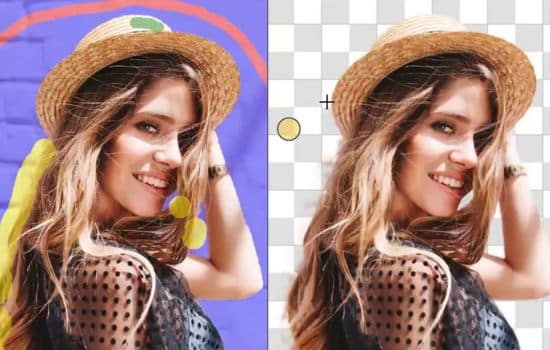
Product photographers for e-commerce require precise color accuracy, background removal tools, and the ability to maintain consistency across multiple images. Some apps specifically cater to these commercial photography needs.
Evaluating Cost Versus Value
Photo editing apps employ various business models. Some are completely free with advertisements. Others offer free basic versions with premium features locked behind subscriptions or one-time purchases.
Free apps can be surprisingly capable, but often include watermarks, limited export resolutions, or restricted feature sets. If you’re serious about your images, investing in premium versions typically pays dividends in capabilities and output quality.
Subscription models provide ongoing updates and cloud features but represent recurring costs. One-time purchase apps cost more upfront but may prove more economical long-term. Consider your budget and usage patterns when evaluating these options.
Mastering Essential Editing Techniques for Stunning Results
Owning powerful editing software means nothing without understanding fundamental techniques. These principles apply regardless of which specific application you choose.
The Art of Subtle Enhancement Over Extreme Transformation
The most common beginner mistake involves over-editing. Cranking saturation to maximum, pushing contrast to extremes, and applying heavy-handed filters creates unnatural-looking images that scream “over-processed!”
Professional-looking edits often involve subtle adjustments across multiple parameters rather than dramatic changes to single elements. Small increases in clarity, moderate shadow lifting, and gentle color shifts combine to create polished results that still look believable.
Develop the habit of zooming out and viewing your image at actual display size periodically during editing. What looks good when examining details closely might appear excessive at normal viewing distances.
Understanding Color Harmony and White Balance 🎨
Color relationships make or break photo aesthetics. Complementary color schemes (opposites on the color wheel) create visual tension and interest. Analogous schemes (neighboring colors) produce harmony and cohesion.
White balance correction ranks among the most impactful adjustments you can make. Correcting color casts transforms muddy, lifeless images into vibrant, appealing photographs. Most apps offer preset white balance options plus manual temperature and tint adjustments.
Don’t feel obligated to always achieve “correct” white balance. Creative white balance choices establish mood. Warmer tones evoke comfort and nostalgia. Cooler temperatures suggest modernity or melancholy. Use color temperature intentionally as an artistic tool.
Working with Light: Exposure, Highlights, and Shadows
Proper exposure management separates adequate photos from exceptional ones. Rather than using a single exposure slider, sophisticated editing involves balancing multiple tonal controls.
Recovery of blown highlights should typically be your first move when editing overexposed areas. Modern apps perform minor miracles recovering detail from seemingly white areas, though prevention during capture always beats correction after the fact.
Shadow lifting reveals hidden detail in darker image areas but requires restraint. Excessive shadow recovery introduces noise and creates flat, unrealistic tonality. Aim for revealing some shadow detail while maintaining depth and contrast that gives images dimension.
Common Photo Editing Mistakes and How to Avoid Them
Even experienced editors fall into certain traps. Awareness of these common pitfalls helps you sidestep them and elevate your editing quality.
The Over-Saturation Trap 🌈
Vibrant colors attract attention, leading many editors to push saturation sliders too far. The result: unnatural, cartoonish images with blown-out colors that distract rather than enhance.
Instead of boosting global saturation, use selective color adjustments to enhance specific hues while leaving others natural. Increase vibrance rather than saturation when you want pop—vibrance intelligently boosts muted colors while protecting already-saturated tones.
Consider that different subjects require different saturation approaches. Landscapes often benefit from enhanced saturation, while portraits typically look best with subtle, natural color rendering.
Ignoring Composition During Cropping
Cropping seems simple but significantly impacts image effectiveness. Thoughtless cropping damages carefully considered compositions captured during shooting.
Apply compositional principles when cropping. The rule of thirds remains relevant—placing key subjects along those intersecting lines typically creates balanced, engaging compositions. However, don’t follow rules slavishly; sometimes centered or unconventional compositions work better.
Maintain appropriate aspect ratios for your intended display platform. Instagram squares require different compositional approaches than wide desktop wallpapers or vertical smartphone screens.
Neglecting to Preserve Original Files
This mistake haunts editors at all skill levels. You perfect an edit, save it, then later realize you want to try a different approach—but you’ve overwritten your original file.
Always work non-destructively when possible. Many professional apps save edits as instructions rather than modifying original files, allowing unlimited revisions. When using apps that don’t support non-destructive workflows, manually save copies of originals before editing.
Cloud backup services provide insurance against accidental deletions or device failures. The heartbreak of losing irreplaceable photos far outweighs the modest cost of cloud storage subscriptions.
Optimizing Your Mobile Editing Workflow for Efficiency ⚙️
Efficient workflows save time and mental energy, allowing you to focus on creativity rather than technical processes. Developing systematic approaches dramatically improves both speed and consistency.
Establishing a Consistent Editing Sequence
Following the same basic order for each edit builds muscle memory and ensures you don’t overlook important adjustments. Most professional workflows proceed from global corrections to local refinements.
Start with fundamental corrections: crop and straighten, then adjust exposure and white balance. These foundational changes establish the baseline from which all other adjustments build.
Next, refine global tonality through highlight, shadow, contrast, and curve adjustments. Follow with color refinements including saturation and individual color channel modifications. Finally, apply selective local adjustments, sharpening, and any creative effects.
Creating and Using Presets Effectively
Presets (saved collections of adjustments) accelerate editing and maintain consistency across photo series. Rather than starting from zero with each image, apply a preset as a starting point and refine from there.
Create your own presets reflecting your personal aesthetic. After editing a photo to your satisfaction, save those settings as a custom preset. Over time, you’ll build a library of starting points for different lighting conditions and subjects.
Don’t treat presets as one-click solutions requiring no further adjustment. The best approach applies presets at reduced strength, then fine-tunes for each individual image’s unique characteristics.
The Future of Mobile Photo Editing Technology 🚀
Artificial intelligence and computational photography continue revolutionizing what’s possible with mobile editing apps. Understanding emerging trends helps you anticipate and leverage new capabilities.
AI-Powered Intelligent Adjustments
Machine learning algorithms now recognize image content and apply contextually appropriate edits. Sky replacement features seamlessly substitute dull skies with dramatic alternatives while maintaining realistic lighting.
Subject detection allows apps to automatically identify and mask people, pets, or objects, enabling sophisticated selective adjustments without manual masking. This technology brings professional-level techniques to casual users.
Neural filters transform photos in previously impossible ways—changing facial expressions, aging or de-aging subjects, or transferring artistic styles with unprecedented quality. While some effects verge on gimmicky, others offer genuine creative value.
Enhanced Collaboration and Cloud Integration
Modern editing apps increasingly emphasize cross-device workflows and collaboration features. Edit on your phone during your commute, continue on your tablet at home, and finalize on your computer—all working with the same files and edit history.
Cloud-based processing offloads intensive computational tasks from your device to powerful remote servers. This enables sophisticated effects on modest hardware and ensures consistent processing regardless of device capabilities.
Collaborative editing features let teams work together on projects, sharing assets and providing feedback within the app environment. These capabilities blur lines between professional and consumer applications.
Building Your Personal Editing Style and Visual Brand
Technical proficiency matters, but developing a recognizable personal aesthetic separates your work from the crowd. Your editing choices communicate as much as your subject selection and composition.
Analyzing Inspiration While Developing Originality 💡
Study photographers whose work resonates with you. Analyze their editing choices—color palettes, contrast levels, tonal relationships. Understanding why certain aesthetic choices work helps you apply similar principles while maintaining originality.
Avoid directly copying others’ presets or slavishly imitating popular styles. Use inspiration as a jumping-off point for developing your unique visual voice. Your personal aesthetic should reflect your perspective and creative sensibilities.
Consistency matters when building a recognizable style, but don’t let it become a creative straitjacket. Allow your aesthetic to evolve naturally as your skills and vision develop over time.
Maintaining Balance Between Trends and Timelessness
Editing trends come and go. Heavy vignettes and extreme HDR looks dominated several years ago but now appear dated. Chasing every trend results in work that looks fresh today but embarrassingly dated tomorrow.
Classic, restrained editing tends toward timelessness. Photographs edited with subtlety and attention to fundamental principles remain appealing regardless of passing fads. When you look back at your work years later, you’ll appreciate this restraint.
That said, don’t completely ignore contemporary aesthetics. Finding the sweet spot between timeless principles and modern sensibilities creates work that feels both current and enduring.
Maximizing Image Quality from Capture Through Final Export
Editing cannot fix everything. The quality of your original capture fundamentally limits what editing can achieve. Understanding this relationship helps you optimize the entire photographic process.
Capturing with Editing in Mind 📷
Shoot with your intended final image in mind. Slight underexposure often works better than overexposure since recovering shadows proves easier than rescuing blown highlights. This particularly applies when shooting high-contrast scenes.
When your app supports RAW format, use it for important images. RAW files contain vastly more image data than JPEGs, providing dramatically more editing flexibility. The difference becomes apparent when making significant tonal or color adjustments.
Consider your editing capabilities when composing shots. If you plan to remove distracting elements, ensure sufficient surrounding texture for healing tools to work effectively. If planning dramatic crops, compose with extra space around your subject.
Understanding Export Settings for Different Platforms
Different platforms require different image specifications. Instagram compression differs from Facebook’s, which differs from printing requirements. Optimizing exports for each destination ensures your carefully edited images display their best.
Resolution matters less than many assume for digital sharing. Most social platforms display images at resolutions far below what modern phone cameras capture. However, maintaining higher resolution protects against quality loss from platform compression.
File format choice impacts both quality and compatibility. JPEG remains the universal standard for sharing, but TIFF or PNG formats preserve maximum quality when archiving edited images or preparing files for print.
Transforming Good Photos Into Exceptional Visual Stories
The ultimate purpose of photo editing extends beyond technical perfection. Your edits should enhance emotional impact and help your images communicate their intended messages more effectively.
Every adjustment decision should serve your image’s story. A moody portrait benefits from different editing choices than a bright, cheerful lifestyle shot. Let the emotion you want to convey guide your technical choices rather than applying the same approach to every image.
Practice regularly and experiment fearlessly. The beauty of digital editing lies in its non-permanence—you can try bold approaches knowing you can always revert to your original. Some of your most distinctive work might emerge from experiments that initially seemed risky.
Remember that the most sophisticated editing in the world cannot substitute for compelling subject matter and thoughtful composition. Great editing enhances already good photographs; it rarely rescues fundamentally flawed ones. Focus on capturing meaningful moments and interesting subjects, then use your editing apps to help those images reach their full potential. ✨
