
Anúncios
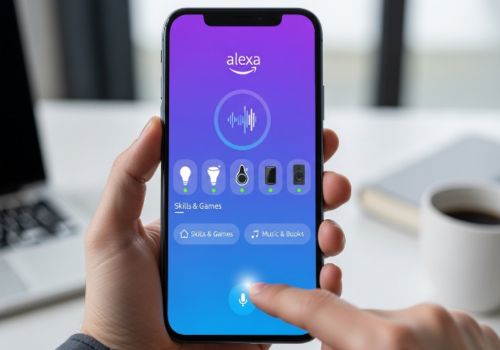
The Alexa app transforms your smartphone into a powerful control center for Amazon’s voice assistant, bringing smart home management, music streaming, and voice commands right to your fingertips.
Whether you own an Echo device or simply want to explore voice assistant capabilities, the Alexa mobile application offers a comprehensive suite of features that enhance your digital lifestyle. From setting up routines to controlling smart devices, this app serves as the bridge between you and the connected home ecosystem.
Anúncios
In this detailed guide, we’ll explore everything you need to know about the Alexa app for mobile devices, including setup instructions, key features, troubleshooting tips, and creative ways to maximize your experience with Amazon’s intelligent assistant. 🎯
📱 What Is the Alexa App and Why You Need It
The Amazon Alexa app is a free mobile application available for both iOS and Android devices that serves as the primary interface for managing Alexa-enabled devices and services. Think of it as the command center for your entire Alexa ecosystem, where you can configure settings, add skills, create routines, and interact with your voice assistant even when you’re away from home.
Anúncios
Unlike the physical Echo devices, the app allows you to access Alexa’s capabilities directly from your smartphone. This means you can ask questions, set reminders, control smart home devices, and check your shopping lists wherever you have an internet connection. The app essentially turns your phone into a portable Echo device with a visual interface.
For those who don’t own any Echo hardware, the app still provides tremendous value. You can use it to experience Alexa’s voice assistant features, manage your Amazon account preferences, shop on Amazon with voice commands, and explore thousands of third-party skills that extend Alexa’s functionality.


🔧 Getting Started: Download and Initial Setup
Setting up the Alexa app is remarkably straightforward, taking just a few minutes from download to full functionality. The process begins by downloading the application from your device’s official app store—either the Google Play Store for Android users or the Apple App Store for iOS devices.
Once installed, launch the app and sign in with your Amazon account credentials. If you don’t have an Amazon account, you’ll need to create one during this step. The app will then request various permissions including microphone access (for voice commands), location access (for weather and local services), and notification permissions (for alerts and reminders).
After granting the necessary permissions, you’ll be guided through a brief tutorial that introduces the app’s main features. If you have an Echo device, the app will prompt you to set it up by connecting it to your Wi-Fi network and registering it to your account. The setup wizard makes this process incredibly user-friendly, even for those who aren’t particularly tech-savvy.
Creating Your Profile and Preferences
Personalizing your Alexa experience starts with configuring your profile settings. Navigate to the settings menu where you can input your address (for location-based services), set your preferred music service, choose your default shopping preferences, and configure privacy settings.
The app also allows you to teach Alexa to recognize your voice through the Voice Profile feature. This personalization enables Alexa to provide customized responses, access your personal playlists, and distinguish between different household members when processing requests.
🌟 Core Features That Make the App Indispensable
The Alexa mobile app packs an impressive array of features that go far beyond simple voice commands. Understanding these capabilities helps you leverage the full potential of Amazon’s voice assistant ecosystem.

Smart Home Control at Your Fingertips
One of the most powerful aspects of the Alexa app is its smart home management capabilities. The Devices tab provides a centralized dashboard where you can view and control all your connected smart devices—lights, thermostats, locks, cameras, plugs, and more.
You can create groups of devices (like “Living Room” or “Bedroom”) to control multiple items simultaneously. The app also supports routines, which are automated sequences that trigger multiple actions with a single command or at scheduled times. For example, a “Good Morning” routine might turn on the lights, start the coffee maker, and read your calendar events.
- Control individual devices or entire groups with a tap
- Monitor device status and battery levels
- Receive notifications when motion sensors or cameras detect activity
- Schedule device actions for specific times
- View live camera feeds from compatible security cameras
Skills and Customization Options
The Skills section of the app functions like an app store for Alexa capabilities. With tens of thousands of skills available, you can add functionalities ranging from meditation guides and workout coaches to trivia games and home automation integrations.
Popular skill categories include productivity tools, food and drink recipes, news briefings, music and entertainment, smart home device control, and educational content. Each skill can be enabled with a single tap, and many require additional account linking for full functionality.
🎵 Music, Entertainment, and Media Management
The Alexa app serves as a comprehensive media hub, allowing you to manage music playback across all your Alexa-enabled devices. You can link multiple music services including Amazon Music, Spotify, Apple Music, Pandora, and others, then set your preferred default service.
The app displays your recently played songs, playlists, and stations, making it easy to resume playback or discover new content. You can also create multi-room music groups, enabling synchronized audio playback across multiple Echo devices throughout your home.
For audiobook enthusiasts, the app integrates seamlessly with Audible, allowing you to browse your library, start new books, and control playback. Podcast support has also been expanded, with Alexa now offering a growing selection of podcasts that can be managed directly through the app.
💬 Communication Features for Staying Connected
The Communicate tab transforms the Alexa app into a communication platform. You can make voice and video calls to other Alexa users, send voice messages, and even use the Drop In feature to instantly connect with designated contacts or Echo devices in your home.
The Announcements feature broadcasts a message to all Echo devices in your household simultaneously—perfect for calling everyone to dinner or making quick household announcements. This functionality works even when you’re away from home, as long as your devices are connected to the internet.
For families, these communication tools provide convenient ways to stay in touch without requiring everyone to have their phones nearby. Kids can ask Alexa to call mom or dad, and parents can check in on home activity through the app’s messaging features.
🛒 Shopping, Lists, and Reminders Made Simple
Alexa excels at helping you stay organized, and the mobile app provides full access to these organizational tools. Your shopping lists, to-do lists, and reminders sync across all devices, ensuring you always have access to important information.
The app allows you to add items to lists manually or by voice, check off completed tasks, and share lists with family members. Shopping lists integrate with Amazon’s online store, often providing quick links to purchase items directly.
Reminders can be location-based (triggering when you arrive at or leave a location) or time-based. The app sends push notifications for all reminders, ensuring you never miss important tasks or appointments.
🔐 Privacy Controls and Security Settings
Amazon has implemented robust privacy controls within the Alexa app, giving users granular control over their data. The Privacy Settings section allows you to review and delete voice recordings, manage how Alexa uses your data for personalization, and control whether Amazon employees can review your recordings to improve the service.
The voice history feature shows a complete log of all your voice interactions with Alexa. You can listen to these recordings, see the transcription Alexa created, and delete individual recordings or entire date ranges with a few taps.
Additional security features include the ability to set a voice purchasing PIN, disable purchasing entirely, and configure notification preferences for package deliveries and other alerts. These controls ensure you can use Alexa with confidence while maintaining your desired level of privacy.
🏠 Advanced Routines for Home Automation Enthusiasts
Routines represent one of the most powerful features within the Alexa app, enabling complex automation sequences that would otherwise require multiple commands or manual intervention. Creating routines involves selecting a trigger (voice command, schedule, device state, or location) and then adding multiple actions that execute in sequence.
For example, a “Leaving Home” routine triggered by your phone’s location could lock smart doors, turn off lights, adjust the thermostat, and pause any playing music. An “Arrival Home” routine might unlock the door, turn on specific lights, and resume your favorite playlist.
The routine builder supports conditional logic in some cases, allowing for more sophisticated automation. You can also enable or disable routines temporarily without deleting them, making it easy to adjust your automation for different seasons or life situations.
📊 Comparing Alexa App Features Across Platforms
| Feature | iOS App | Android App |
|---|---|---|
| Voice commands | ✅ Full support | ✅ Full support |
| Widget availability | Limited widgets | Multiple widget options |
| Hands-free Alexa | Limited to app | System-wide integration |
| Smart home control | ✅ Identical | ✅ Identical |
| Skills management | ✅ Identical | ✅ Identical |
| Drop In/Calling | ✅ Full support | ✅ Full support |
🔍 Troubleshooting Common Issues
Even with its polished interface, users occasionally encounter issues with the Alexa app. Understanding common problems and their solutions can save significant frustration and restore functionality quickly.
Connectivity and Sync Problems
If your devices aren’t appearing in the app or aren’t responding to commands, start by checking your internet connection. Both your phone and Alexa devices need stable internet access to communicate. Try toggling your phone’s Wi-Fi off and on, or switching to mobile data temporarily to isolate the problem.
Device discovery issues can often be resolved by forcing the app to refresh. Pull down on the Devices screen to trigger a manual sync. If devices still don’t appear, try disabling and re-enabling the associated skill or unlinking and relinking your smart home account.
Voice Recognition Challenges
When Alexa struggles to understand commands through the app, ensure you’ve granted microphone permissions and that no other apps are monopolizing audio input. Background noise can also interfere with recognition—try using the app in a quieter environment or speaking more clearly.
Retraining your voice profile sometimes improves recognition accuracy. Navigate to Settings > Your Profile > Voice and follow the prompts to create a new voice sample.
✨ Pro Tips for Maximizing Your Alexa App Experience
Power users discover creative ways to leverage the Alexa app beyond its obvious features. These advanced tips can significantly enhance your daily interactions with the assistant.
Enable Brief Mode in settings to make Alexa respond with sounds instead of spoken confirmations for routine actions like turning lights on and off. This reduces verbal clutter while maintaining feedback that commands were executed.
Use the Whisper Mode feature when you need Alexa to respond quietly, perfect for late-night use without disturbing sleeping family members. Simply whisper your command, and Alexa will whisper back.
Explore the Alexa Blueprints feature, which allows you to create custom skills without coding. You can build personalized storytelling experiences, custom Q&A responses, and family trivia games that reflect your unique interests and knowledge.
Take advantage of location-based routines by allowing the app to track your phone’s location. This enables automatic actions when you leave or arrive home, creating a truly smart home experience that adapts to your presence.
🌐 Integration with Third-Party Services and Ecosystems
The true power of the Alexa app emerges when you connect it with third-party services and smart home ecosystems. The app supports integration with hundreds of brands and platforms, creating a unified control interface for your digital life.
Calendar integration allows Alexa to access your Google Calendar, Microsoft Outlook, or Apple Calendar events, enabling the assistant to provide schedule updates and meeting reminders. Email integration similarly connects with major email providers for hands-free message management.
For smart home enthusiasts, the app supports major platforms including SmartThings, Philips Hue, Ring, Nest, and countless others. Once connected, these devices appear alongside native Alexa devices in your app interface, providing centralized control regardless of manufacturer.
🚀 Future Updates and Evolving Capabilities
Amazon continuously updates the Alexa app with new features and improvements. Recent additions have included enhanced visual design, faster navigation, improved routine creation tools, and expanded support for new device categories.
The company has signaled intentions to deepen AI capabilities, potentially incorporating more conversational understanding and context awareness. Future updates may include better predictive suggestions, more sophisticated automation logic, and enhanced personalization based on usage patterns.
Staying updated requires enabling automatic app updates on your device or regularly checking the app store for new versions. Amazon also announces major feature rollouts through the app’s notification system and on their official blog.
💡 Making the Most of Your Mobile Alexa Experience
The Alexa app for mobile devices represents far more than a simple remote control for Echo speakers. It’s a comprehensive platform that brings voice assistant capabilities, smart home management, communication tools, and entertainment options into a single, accessible interface.
By taking time to explore the app’s depth—configuring routines, enabling useful skills, connecting smart devices, and personalizing settings—you unlock tremendous convenience and functionality. The app transforms your smartphone into a powerful control center for your connected life, accessible anywhere you have an internet connection.
Whether you’re managing your smart home from work, setting reminders while running errands, or enjoying music through synchronized speakers, the Alexa mobile app ensures Amazon’s voice assistant remains your constant companion. Download it today and discover how voice technology can simplify your daily routines and enhance your digital lifestyle. 🎉
