
Anúncios
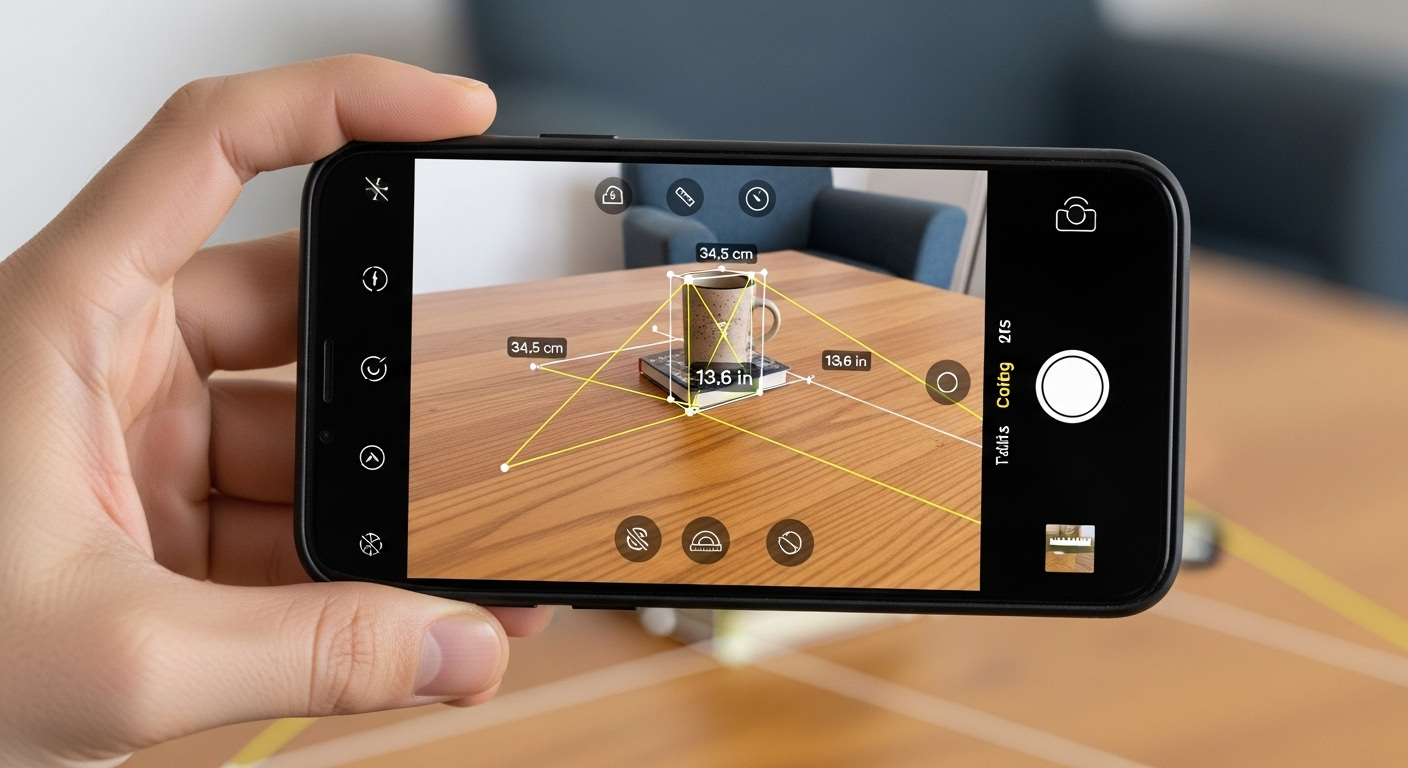
Measuring distances, dimensions, and objects has never been easier thanks to innovative smartphone apps that transform your camera into a digital measuring tool.
Gone are the days when you needed to carry a physical tape measure or ruler everywhere you go. With augmented reality (AR) technology and advanced smartphone sensors, measuring applications have revolutionized how we approach everyday tasks. Whether you’re a DIY enthusiast planning your next home improvement project, a real estate professional documenting property dimensions, or simply someone who needs quick measurements on the go, these apps offer incredible convenience and accuracy.
Anúncios
The technology behind camera-based measuring apps relies on sophisticated algorithms that analyze depth perception, perspective, and spatial relationships. By leveraging your phone’s camera, gyroscope, and accelerometer, these applications can calculate dimensions with surprising precision. Let’s explore everything you need to know about these remarkable tools and how they can simplify your life. 📱
How Camera Measuring Apps Actually Work
Understanding the technology behind these applications helps you appreciate their capabilities and limitations. Modern smartphones are equipped with advanced sensors that work together to create accurate measurements through your camera lens.
Anúncios
When you point your camera at an object, the app uses augmented reality frameworks like ARKit (iOS) or ARCore (Android) to map the three-dimensional space around you. These frameworks analyze multiple data points including device motion, camera position, and environmental lighting to build a virtual representation of your surroundings.
The gyroscope and accelerometer track your phone’s movement and orientation, while the camera captures visual information. By combining these inputs, the app calculates distances by identifying reference points and measuring the space between them. Some advanced apps even use LiDAR sensors available on newer iPhone models, which send out laser pulses to measure distances with exceptional accuracy.


The Science Behind Augmented Reality Measurement 🔬
Augmented reality measurement apps employ computer vision techniques to detect surfaces, edges, and corners in real-time. The software identifies horizontal and vertical planes, allowing you to place virtual measurement points on physical objects.
Feature detection algorithms scan the camera feed for distinctive visual markers that can be tracked as you move your device. These markers help the app maintain spatial awareness and ensure measurements remain accurate even when you adjust your viewing angle.
The depth estimation process involves analyzing parallax – the apparent displacement of objects when viewed from different positions. As you move your phone, the app calculates how objects shift relative to each other, determining their distance from the camera and their actual size.
Top Features to Look for in Measuring Apps
Not all camera measuring applications are created equal. When selecting the right tool for your needs, consider these essential features that distinguish exceptional apps from basic ones.
Multiple measurement modes provide flexibility for different scenarios. Look for apps offering linear measurements, area calculations, volume estimation, and angle detection. The ability to measure multiple dimensions simultaneously saves time and enhances productivity.
Screenshot and annotation capabilities allow you to document measurements with visual context. This feature proves invaluable when shopping for furniture, planning renovations, or communicating specifications to contractors and colleagues.
Accuracy and Calibration Options ✅
The most reliable apps include calibration features that let you adjust measurements based on known dimensions. This ensures consistent accuracy across different environments and lighting conditions.
Some applications offer manual adjustment options, allowing you to fine-tune measurements when precision is critical. While camera-based measurements typically achieve accuracy within 1-2% for distances up to several meters, calibration can improve results significantly.
Real-time feedback displays measurement confidence levels, helping you understand when conditions are optimal for accurate readings. Factors like lighting, surface texture, and distance all affect measurement reliability.
Practical Applications for Everyday Life
Camera measuring apps serve countless purposes across various industries and personal activities. Understanding these applications helps you maximize the value of these versatile tools.
Home improvement projects become significantly easier when you can quickly measure spaces, furniture, and materials. Determine whether that new couch will fit in your living room, calculate how much paint you need for a wall, or plan kitchen renovations with confidence.
Online shopping transforms from guesswork into informed decision-making. Measure available space before purchasing furniture, appliances, or decorative items. This prevents costly returns and ensures your new purchases integrate seamlessly into your home.
Professional Uses Across Industries 🏗️
Real estate professionals use measuring apps to document property dimensions, create floor plans, and provide accurate listings. This technology streamlines property assessments and enhances client presentations with precise measurements.
Construction workers and contractors rely on these apps for quick field measurements, material estimates, and project planning. While professional-grade tools remain essential for critical measurements, camera apps provide convenient verification and preliminary assessments.
Interior designers utilize measuring applications to plan room layouts, furniture placement, and spatial arrangements. The ability to visualize measurements in context helps create functional and aesthetically pleasing designs.
Comparing Different Measurement Techniques
Understanding various measurement methods available within these apps helps you choose the right approach for each situation. Different techniques offer distinct advantages depending on your specific needs.
Point-to-point measurement represents the most straightforward method, allowing you to tap two locations on your screen to measure the distance between them. This works well for simple linear measurements like wall lengths or object dimensions.
Surface measurement automatically detects flat planes and calculates their area. This feature excels when determining floor space, wall coverage, or tabletop dimensions. Simply point your camera at a surface, and the app outlines the measurable area.

Advanced Measurement Modes 📐
Height measurement uses reference points to calculate vertical dimensions. By identifying the floor plane and marking the top of an object, apps can accurately determine height without requiring you to physically reach the top.
Path measurement allows you to create multi-point measurements that follow irregular shapes or room perimeters. This proves particularly useful when measuring spaces with architectural features, alcoves, or non-rectangular layouts.
Volume calculation combines length, width, and height measurements to determine three-dimensional capacity. This feature helps estimate storage space, shipping requirements, or material quantities for boxes and containers.
Tips for Achieving Maximum Accuracy
While camera measuring apps offer impressive convenience, following best practices ensures you achieve the most reliable results possible. Environmental conditions and technique significantly impact measurement precision.
Optimal lighting conditions enhance the app’s ability to detect surfaces and edges accurately. Natural daylight or bright, even artificial lighting produces the best results. Avoid measuring in dim conditions or harsh shadows that obscure surface details.
Stable phone positioning minimizes measurement errors caused by hand movement. Rest your elbows against your body or use a stable surface to support your device while measuring. Some apps include shake detection that alerts you when movement affects accuracy.
Environmental Considerations 🌞
Surface texture influences measurement reliability. Apps perform better on surfaces with visible texture or patterns that provide visual reference points. Completely smooth or reflective surfaces may challenge the detection algorithms.
Measuring distance affects accuracy exponentially. Measurements within 1-3 meters typically yield the highest precision, while longer distances introduce increasing margin of error. For critical long-distance measurements, verify results with traditional tools.
Room temperature and device calibration play subtle but important roles. Extreme temperatures can affect sensor performance, so allow your phone to acclimate to indoor conditions before measuring in environments with significant temperature differences.
Understanding Measurement Units and Conversions
Quality measuring apps support multiple unit systems, allowing you to work with your preferred measurement standards. This flexibility accommodates international users and various professional requirements.
Metric system support includes millimeters, centimeters, and meters, providing decimal-based precision favored in most countries worldwide and scientific applications. This system simplifies calculations and conversions.
Imperial system options offer inches, feet, and yards for users in countries like the United States. Many apps display measurements in both systems simultaneously, facilitating communication across different regional standards.
Converting Between Systems Seamlessly 🔄
Built-in conversion tools eliminate the need for separate calculation apps. Toggle between metric and imperial units instantly, ensuring you can communicate measurements regardless of your audience’s preferred system.
Precision settings allow you to choose decimal places appropriate for your task. General home projects might only require measurements to the nearest inch or centimeter, while detailed work demands greater precision.
Custom unit preferences save your preferred settings, streamlining repeated measurements. Configure your default units once, and the app remembers your choices for future sessions.
Privacy and Data Security Considerations
When using camera-based applications, understanding privacy implications ensures you protect sensitive information. Measuring apps access your camera and potentially store images, raising important security considerations.
Reputable apps clearly state their data usage policies and obtain explicit permission before accessing device features. Review privacy settings before granting camera access, and ensure the app doesn’t transmit measurements or images without your consent.
Photo storage options vary between apps. Some save measurement screenshots directly to your photo library, while others maintain separate internal storage. Understand where your data resides and how long it’s retained.
Managing App Permissions Wisely 🔒
Grant only essential permissions required for core functionality. While camera access is obviously necessary for measuring apps, be cautious about additional permissions like location tracking or contact access that aren’t relevant to measurement tasks.
Regular app updates often include security improvements and privacy enhancements. Enable automatic updates or periodically check for new versions to ensure you benefit from the latest protections.
Sensitive measurements should be documented carefully. When measuring in secure locations or documenting proprietary information, verify that measurement data isn’t automatically uploaded to cloud services or shared with third parties.
Troubleshooting Common Measurement Issues
Even the best measuring apps occasionally encounter challenges. Recognizing common problems and their solutions helps you maintain productivity when issues arise.
Surface detection failures often occur on featureless or highly reflective surfaces. If the app struggles to identify a surface, try adding temporary visual markers like tape or paper to provide reference points for the detection algorithms.
Inconsistent measurements may indicate calibration drift or environmental factors. Close and restart the app, ensure adequate lighting, and verify that you’re holding your phone steadily throughout the measurement process.
Technical Solutions for Better Performance ⚙️
Device compatibility varies significantly between older and newer smartphones. While most modern phones support AR measurement apps, devices from recent years with advanced sensors deliver superior accuracy and reliability.
App cache and storage issues can degrade performance over time. Periodically clear app cache through your device settings, and ensure sufficient storage space remains available for the app to function optimally.
Software conflicts with other apps occasionally interfere with measurement accuracy. If you experience persistent issues, try closing background apps, especially those using camera or AR features, before launching your measuring app.
Future Developments in Mobile Measurement Technology
The evolution of smartphone measurement capabilities continues rapidly, with emerging technologies promising even greater accuracy and functionality in coming years.
LiDAR integration represents a significant advancement already appearing in premium smartphones. This laser-based technology measures distances by calculating light pulse travel time, achieving professional-grade accuracy through consumer devices.
Artificial intelligence enhancements enable smarter object recognition and automatic measurement suggestions. Future apps may automatically identify common items and provide standard dimensions, or suggest optimal measurement points for complex objects.
The Next Generation of AR Measurement 🚀
Multi-device collaboration features will allow multiple users to contribute to shared measurement projects. Imagine architectural teams simultaneously measuring different aspects of a building, with results automatically consolidated into comprehensive documentation.
Cloud-based processing will leverage powerful remote servers to perform complex calculations that exceed smartphone capabilities. This enables more sophisticated measurement algorithms while maintaining responsive performance on your device.
Integration with 3D modeling software will transform measurements into complete digital models. Capture room dimensions, and the app automatically generates a virtual representation suitable for renovation planning or virtual staging.
Making the Most of Your Measuring App Experience
Maximizing the value of camera measuring applications requires understanding their strengths and integrating them effectively into your workflow. These tools complement rather than replace traditional measuring equipment.
Practice with known dimensions to build confidence in your app’s accuracy and develop proper technique. Measure familiar objects whose dimensions you’ve verified with traditional tools, comparing results to understand typical accuracy ranges.
Document important measurements with screenshots that include visual context. This creates comprehensive records more valuable than numbers alone, especially when communicating with others or referencing measurements later.
Combine digital and traditional methods for critical applications. Use your measuring app for convenient preliminary measurements and general planning, but verify crucial dimensions with physical measuring tools when precision is essential.
Enhancing Productivity Through Smart Measurement
Camera measuring apps represent more than convenient novelties – they’re powerful productivity tools that save time, reduce errors, and enhance decision-making across countless scenarios. By transforming your smartphone into a versatile measuring instrument, these applications eliminate the need to carry separate tools while providing instant access to dimensional information whenever you need it. 📏
The technology continues advancing rapidly, with improvements in sensor accuracy, algorithm sophistication, and feature integration making these apps increasingly capable and reliable. Whether you’re a professional requiring frequent measurements or simply someone who occasionally needs to check if something fits, these applications offer genuine value that justifies their place on your smartphone.
Embrace this technology as part of your digital toolkit, understanding both its remarkable capabilities and reasonable limitations. With proper technique and realistic expectations, camera measuring apps provide convenience and functionality that genuinely enhance how we interact with the physical world around us.
