
Anúncios
Modern smartphones pack powerful hardware, but the right app can unlock hidden potential and transform your mobile photography experience into something truly professional.


While phone manufacturers invest billions in camera technology, the native camera apps often leave advanced features locked away or simplified for casual users. Third-party camera applications bridge this gap, offering manual controls, advanced processing algorithms, and professional-grade tools that can elevate your photography from snapshots to stunning visual stories.
Anúncios
Whether you’re a content creator seeking that perfect Instagram shot, a budding photographer exploring mobile capabilities, or simply someone who wants better photos without carrying a DSLR, understanding how camera apps can enhance your device opens up a world of creative possibilities. Let’s explore how these applications work their magic and which features truly matter.
📸 Why Your Phone’s Camera Needs an Upgrade
The default camera app on your smartphone is designed for speed and simplicity. It’s optimized for the average user who wants to point, shoot, and share quickly. However, this convenience comes at a cost—limited control over critical photography elements like exposure, focus, and color processing.
Anúncios
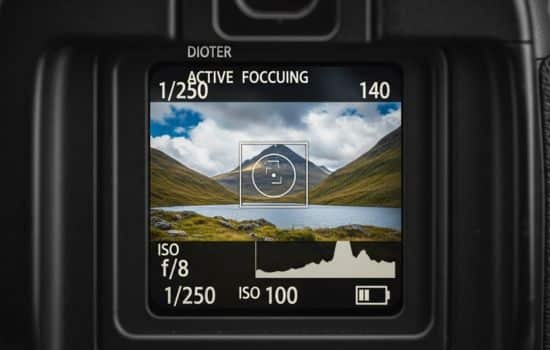
Third-party camera apps tap into the raw capabilities of your phone’s camera sensor, often accessing features that the stock app deliberately hides. These applications provide granular control over ISO, shutter speed, white balance, and focus—parameters that professional photographers consider essential for creative expression.
Beyond manual controls, advanced camera apps employ sophisticated computational photography techniques. They can capture multiple exposures simultaneously, apply intelligent noise reduction, enhance dynamic range, and even simulate the bokeh effect of expensive lenses. The result is noticeably sharper, more vibrant, and professionally balanced images.
🎯 Essential Features That Actually Matter
Not all camera apps are created equal, and flashy interfaces don’t always translate to better photos. Understanding which features genuinely improve image quality helps you choose the right tool for your needs.
Manual Controls: Taking the Creative Reins
Professional photographers rarely use automatic modes because they understand that cameras can’t read artistic intent. Manual controls let you decide how your image should look rather than accepting the camera’s best guess.
ISO control determines your sensor’s light sensitivity. Lower values (100-400) produce cleaner images in bright conditions, while higher values (800-3200) allow shooting in dim environments at the cost of some noise. The ability to lock ISO prevents unwanted brightness fluctuations in challenging lighting.
Shutter speed dictates how long the sensor captures light. Fast speeds (1/1000s or quicker) freeze motion—perfect for sports or wildlife. Slower speeds (1/30s to several seconds) create intentional blur for waterfalls or light trails, adding dramatic motion effects to static scenes.
RAW Format Support: Preserving Maximum Information
When your phone saves a JPEG, it applies automatic processing that permanently discards data to reduce file size. RAW files preserve every bit of information captured by the sensor, providing maximum flexibility during editing.
This matters enormously when you need to recover details from shadows, tame blown highlights, or dramatically adjust white balance. A RAW file might rescue an underexposed shot that would be unsalvageable as a JPEG. Professional photographers consider RAW capability non-negotiable.
Focus Peaking and Zebra Patterns: Precision Tools
Focus peaking highlights in-focus areas with colored outlines, making manual focus dramatically easier—especially for macro photography or when shooting through obstacles. This feature, borrowed from professional video cameras, eliminates the guesswork from critical focus decisions.
Zebra patterns overlay diagonal stripes on overexposed areas of your frame, warning you before you capture a photo with blown highlights. This real-time feedback prevents common exposure mistakes that ruin otherwise perfect moments.

🌟 How Advanced Apps Improve Image Quality
Camera apps don’t just provide more buttons—they fundamentally change how your phone processes images. Understanding these improvements helps you maximize their potential.
Computational Photography Magic
Modern camera apps employ multi-frame processing, capturing several images in rapid succession and intelligently combining them. This technique reduces noise, expands dynamic range, and increases detail beyond what a single exposure can achieve.
HDR (High Dynamic Range) functionality in premium apps often surpasses native implementations by using more sophisticated alignment and tone-mapping algorithms. The result is images with detail in both bright skies and dark shadows—without the artificial, over-processed look that gives HDR a bad reputation.
Night mode implementations in third-party apps sometimes outperform manufacturer solutions by allowing longer exposures, smarter noise reduction, and better color accuracy. They transform impossible low-light scenarios into usable, even impressive photographs.
Advanced Color Science
Color processing separates amateur snapshots from professional images more than any other factor. Advanced camera apps often include multiple color profiles inspired by classic film stocks or professional camera systems.
White balance control becomes crucial in mixed lighting situations—a warm indoor scene viewed through a window on a cloudy day creates color chaos for automatic systems. Manual white balance ensures skin tones look natural and colors render accurately regardless of complex lighting conditions.
📱 Making the Most of Your Hardware
Even budget smartphones contain surprisingly capable camera sensors—they just need software that knows how to use them properly. Understanding your phone’s limitations and strengths helps you choose appropriate apps and techniques.
Sensor Size Still Matters
Physics imposes real limits that no app can completely overcome. Larger sensors capture more light and produce better image quality, especially in challenging conditions. However, intelligent processing can extract performance that basic camera apps leave untapped.
If your phone has multiple lenses (wide, ultra-wide, telephoto), advanced apps often provide better control over which lens is active and when switching occurs. This prevents the automatic lens-switching that can create inconsistent exposures in video or time-lapse sequences.
Stabilization Techniques
While optical image stabilization is hardware-dependent, software can still make dramatic improvements. Electronic stabilization in advanced apps analyzes motion patterns and applies sophisticated corrections that reduce blur from hand-shake.
For intentionally long exposures, some apps include countdown timers, vibration reduction delays, and volume-button shutter triggers—all helping you minimize camera movement during critical exposure moments.
🎨 Creative Possibilities Beyond Basic Photography
Professional camera apps unlock creative techniques that the average phone user never explores, transforming your device into a versatile creative tool.
Long Exposure Photography
Capturing light trails from traffic, silky smooth waterfalls, or star trails requires the ability to keep the shutter open for seconds or even minutes. Advanced apps make this possible with bulb mode, allowing exposures limited only by battery life and patience.
These extended exposures create surreal effects impossible to achieve with quick snapshots, adding an artistic dimension to ordinary scenes. A busy intersection becomes a river of light; crashing waves transform into ethereal mist.
Time-Lapse and Interval Photography
Watching clouds race across the sky or flowers bloom in seconds requires capturing hundreds of images at precise intervals. Professional camera apps provide comprehensive intervalometer functions with exposure ramping—automatically adjusting settings as light changes during sunrise or sunset sequences.
This capability turns your phone into a time-lapse powerhouse comparable to dedicated cameras costing thousands of dollars. The key is having reliable interval control and the ability to lock exposure to prevent flickering in the final sequence.
💡 Practical Tips for Better Mobile Photography
Having powerful software means nothing without understanding how to use it effectively. These practical strategies help you capture consistently better images.
Master Exposure Triangle Basics
ISO, shutter speed, and aperture (though phone apertures are typically fixed) work together to create proper exposure. Understanding their relationship helps you make informed decisions rather than randomly adjusting settings.
In bright conditions, use the lowest ISO possible and a fast shutter speed for maximum sharpness. As light decreases, you’ll need to compromise—raising ISO adds noise, slowing shutter speed risks blur. Knowing which sacrifice matters less for your specific shot separates good from great results.
Composition Never Goes Out of Style
The most advanced app can’t fix poor composition. Rule of thirds, leading lines, negative space, and thoughtful framing remain fundamental regardless of your equipment or software.
Many advanced camera apps include customizable grid overlays—golden ratio, square formats, or even custom guides. These tools help you compose thoughtfully rather than cropping extensively later, preserving maximum resolution and image quality.
Clean Your Lens Regularly
This sounds obvious, but fingerprints, dust, and pocket lint create more image quality problems than any software can solve. A quick wipe with a microfiber cloth before important shots takes two seconds and prevents disappointment later.
🔍 Choosing the Right App for Your Needs
Different photographers have different priorities. Content creators need quick, reliable results with minimal editing. Enthusiasts want maximum control and flexibility. Understanding your workflow helps identify which features matter most.
For Social Media Content Creators
If Instagram, TikTok, or YouTube are your primary platforms, prioritize apps with quick-access presets, efficient batch processing, and integrated editing tools. You need consistent results fast—manual control matters less than reliable automation that matches your aesthetic.
Look for apps with aspect ratio presets matching your platform requirements, color profiles that need minimal adjustment, and seamless sharing workflows. Time spent fiddling with settings is time not creating content.
For Photography Enthusiasts
Serious photographers should prioritize RAW capture, comprehensive manual controls, and histogram displays. These features provide maximum creative control and image quality, even if they require more learning investment.
Advanced focusing tools like focus peaking and split-screen manual focus make precision possible. If you’re willing to spend time on each shot, these capabilities unlock phone photography that rivals dedicated cameras in many situations.
🚀 Taking Your Mobile Photography to Professional Levels
With the right app and developed skills, your smartphone becomes a legitimate professional tool capable of producing work that clients will pay for and publications will print.
Understanding When Gear Still Matters
Phones excel at wide-angle photography in good light. They struggle with distant subjects (true optical zoom remains superior to digital cropping), extreme low-light situations, and scenarios requiring maximum dynamic range.
Knowing these limitations prevents frustration and helps you choose the right tool for each job. Sometimes your phone and an advanced app are perfect; other times, they simply can’t compete with larger sensors and optical systems.
Post-Processing Workflow Integration
The best camera apps integrate smoothly with professional editing software. Look for apps that export RAW files in standard formats (DNG) that open in Lightroom, Photoshop, or other editing applications you prefer.
This workflow flexibility means you’re not locked into a single ecosystem. You can capture with the app that provides best results, then edit wherever your skills and preferences lie.
✨ The Future Is Already in Your Pocket
Smartphone camera technology advances at an incredible pace, with each generation bringing capabilities that seemed impossible years earlier. Third-party apps ensure you’re not limited by manufacturer decisions about which features to expose or simplify.
The democratization of photography continues—tools once requiring expensive equipment and specialized knowledge now fit in your pocket and can be mastered through experimentation. This accessibility doesn’t diminish the craft; it expands who can participate in creating powerful visual stories.
Advanced camera apps represent the key to unlocking your phone’s true potential. They transform capable hardware into creative instruments, putting professional-level control at your fingertips without requiring you to carry additional equipment.
The best camera remains the one you have with you. By enhancing that camera with sophisticated software, you ensure you’re never unprepared when inspiration strikes or moments demand to be captured. Your smartphone, empowered by the right app, becomes a genuine creative tool worthy of serious artistic expression.
Whether you’re documenting family memories, building a social media presence, or pursuing photography as a serious hobby or profession, understanding and utilizing advanced camera applications elevates your work beyond casual snapshots into images worth keeping, sharing, and remembering.
